A minute of reading, and you know your speed
Read a paper book, photograph what you read, and SpeedReading counts the words and shows your words per minute.
Free. iPhone and iPad with iOS 18 or later, or an Android phone.
Speed reading without big promises
We don’t promise speed reading miracles or reading five times faster. We give you an honest way to see how you read now, and to notice when it gets better.
Measured on a real book
No test passages on a screen. You read what you always read, and the camera counts the words.
-
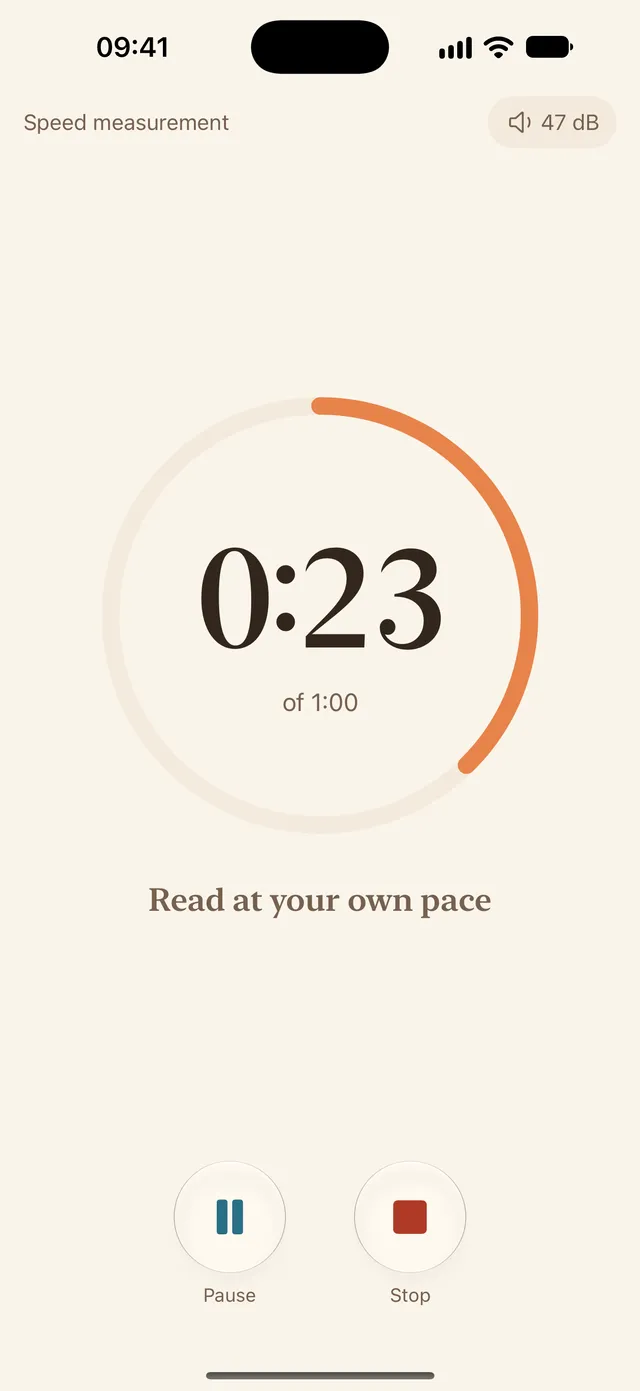
Read for a minute at your own pace
Open your book at the right page and tap “Measure speed”. A timer counts down the minute, so read as usual, with no rush. You can pick the length: one, two or five minutes, or your own.
-
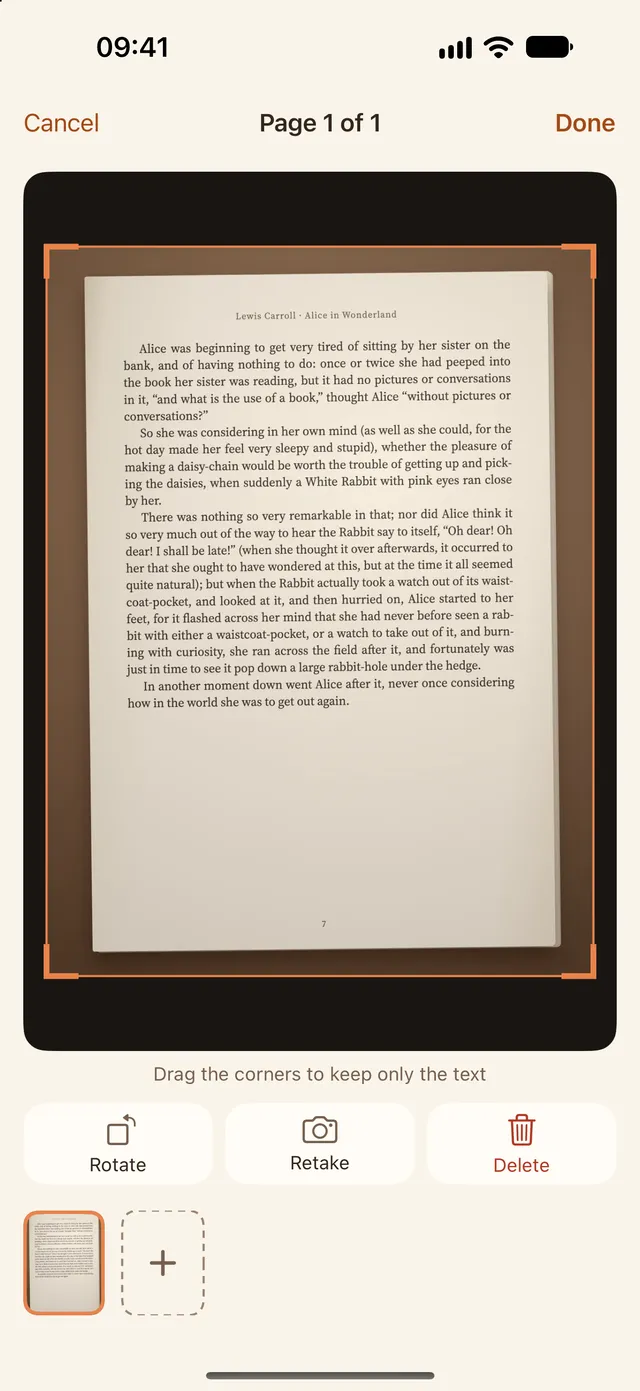
Photograph what you read
When time is up, the camera opens. Shoot the pages you got through and drag the corners to keep only the text.
-
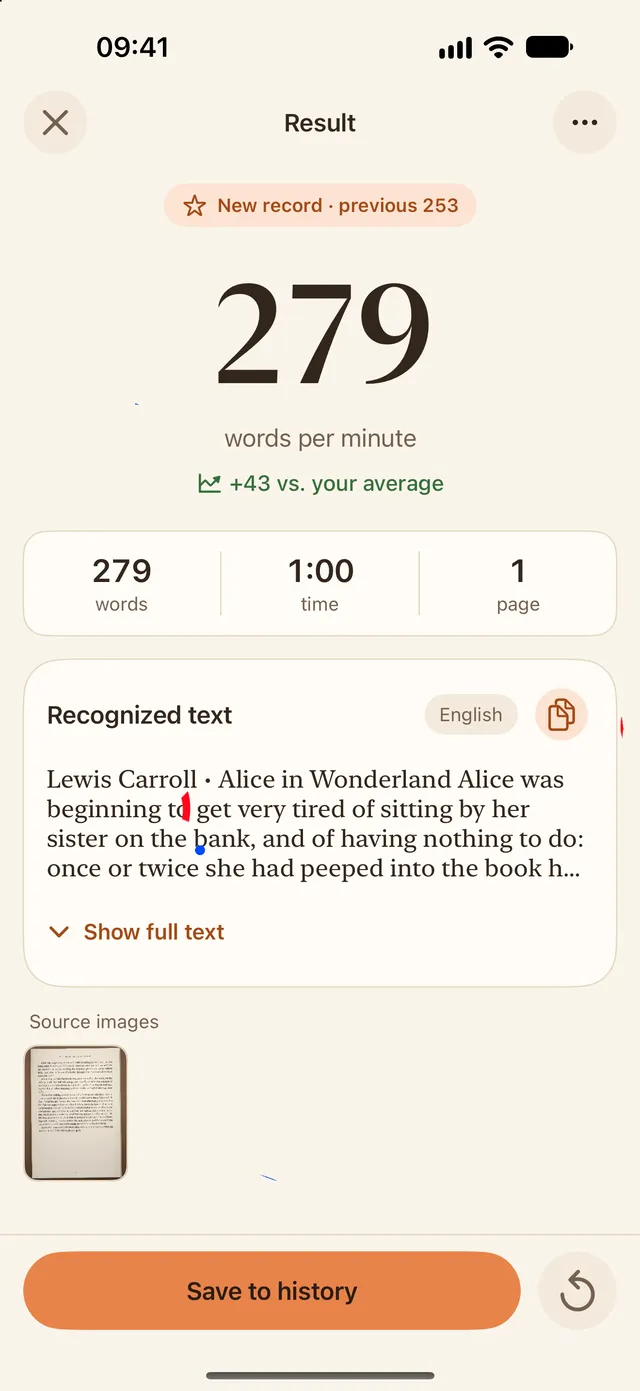
Get your words per minute
The app counts the words and shows your speed. Save the measurement: it goes into your history, so the next one has something to compare with.
Already finished? Count from a photo
Photograph a page or pick a shot from your library. The app counts the words, and if you enter how long you read, it shows your speed too.
Photos and text are processed on your device
Photos aren’t sent anywhere, and your measurements stay on your phone. Recognition works offline.
Train in short sets
A few minutes a day is easier to fit in than an hour at the weekend. The phone lies nearby and the book stays in your hands: the app sets the pace, marks the time with sound and offers to measure your speed afterwards.
Eight rounds of 30 seconds’ reading with 10-second breaks. You can change the number of rounds and both times.
Set a time, say five minutes. When it’s up, the app opens the camera and works out your speed.
Read as long as you like and stop when you finish the chapter. The time is already in your measurement.
Next: rest 0:10
See your progress week by week
Every measurement goes into your history: a chart by week, month and year, search by title and a map of the places you’ve read.
The average uses only your own measurements: you compare yourself with yourself, not with a norm from the internet.
204words per minute
- readings
- 5
- minutes
- 11
- pages
- 18
And everything around the book
-
Widgets and Live Activity iPhone
Your weekly speed on the Home Screen, the training timer on the Lock Screen and in the Dynamic Island.
-
Focus iPhone
Turn on a Focus mode while you read, so notifications stay out of the way.
-
Reminders
A nudge to read on the days and at the times you choose.
-
Background noise
See how quiet it is around you during a measurement. The noise level is saved with the result.
-
Share your result
A result card for a story, post or square, in the Day, Evening or Apricot style.
-
Move your history
All your measurements in one file, onto a new phone, with nothing lost or doubled.
-
Reading map
Where you read: at home, on the train, on holiday. A place is saved only if you allow it.
-
Retelling and quiz Soon
A summary of what you read and comprehension questions, from a local model right on your phone.
Try it in your browser
Two free tools with no install and no sign-up. Your text stays on your device.
- Reading speed test Read a short passage, answer a few questions and see how many words per minute you read.
- Word counter Get the word count, characters, sentences and reading time for any text you paste.
Articles
Questions
Is this a speed reading app?
Not the kind that promises thousands of words per minute. SpeedReading measures your reading speed and helps you read regularly in short sessions. Read what research says about speed reading.
How do I count the words in a text?
For a paper page, photograph it in the app and the word count runs on your phone. For text on a screen, paste it into the free word counter.
How much does it cost?
The beta is free. All you need is a paper book, a minute and honest feedback: what gets in the way, what’s missing, where the app miscounted.
How do I install it on iPhone?
Install the TestFlight app from the App Store, then open the “Install in TestFlight” link on this page and tap Accept and Install. Requires iOS 18 or later.
How do I install the APK on Android?
Download the file to your phone and open it. Android will ask you to allow installs from this source: allow it for the browser you used, then tap Install.
Where do my photos go?
Nowhere. Text is recognized on your phone, and your measurements stay there. The app collects no analytics and needs no account.
Is it suitable for a child?
You can measure speed on any book, including a school one. School reading norms aren’t built in: the app shows only your own measurements and how they change.
How do I leave feedback?
On iPhone, take a screenshot and choose Share Beta Feedback, or tap Send Beta Feedback on the app’s page in TestFlight. We read every one.

Pick up a book. You have a minute.
Free beta for iPhone, iPad and Android.